Know where
your AI spend goes.
Connect AI costs to the people, projects and tickets behind them. Give your team room to work. Keep control of the spend.
The number is only
the beginning.
Scroll to follow the work.
Or choose a chapter below.
Start with the full picture.
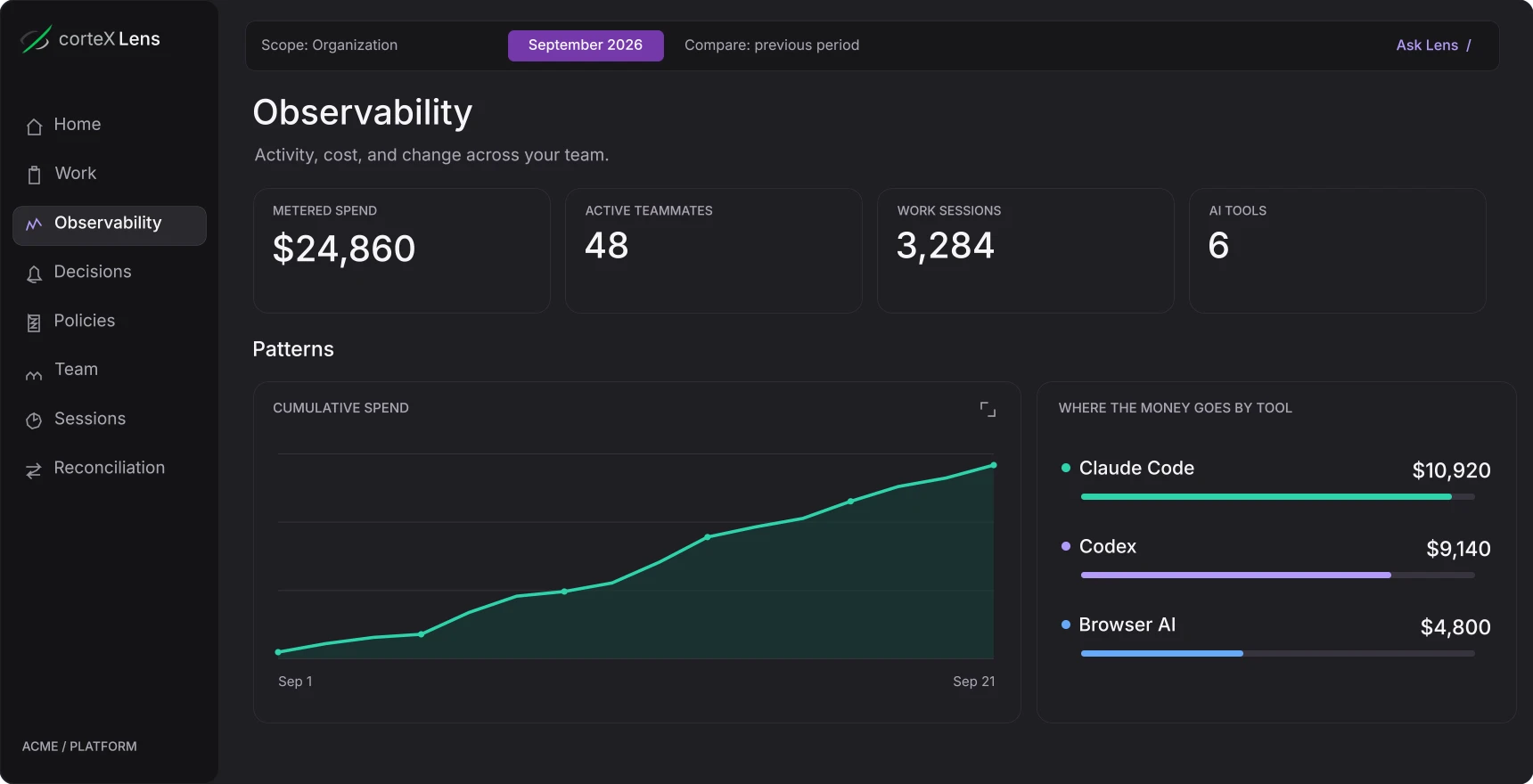
One view of AI spending across your team’s tools. See how costs change, without chasing individual usage reports.
A closer look, at your pace.
Try the tabs in the preview.
 corteX LensIllustrative data
Observability
Across your AI tools
- $10,920Claude CodeCoding agent
- $9,140CodexCoding agent
- $4,800Browser AIBrowser-based tools
Minutes to the first dollar.
Days to the full picture.
Lens starts from the telemetry your tools already emit and the tracker you already run. Engineers keep their tools and their habits.
Connect your AI tools
Add one managed policy for Claude Code through Jamf, Intune or a managed settings file, then install the Lens plugin, which adds the repository and branch behind each session.
Codex, Cursor, GitHub Copilot and browser AI tools are in early access.Connect the work
Connect Jira or Linear and name branches after tickets. Spend lands on the right project and ticket without anyone tagging sessions by hand.
No Jira yet? Spend still rolls up by person, project and tool.Decide what happens next
Follow spend by project, person, tool and ticket as sessions arrive. Add budgets, alerts and usage policies when you are ready to use them.
Real-time limits apply in Claude Code through the Lens plugin. Other tools are measured as their data arrives.
A ticket has a purpose.
Now its AI spend does, too.
Set an AI budget directly in Jira. See the cost of the work, the people involved and the tools they used.
Already working on it? Spending is tracked even without a ticket budget. Your team keeps using its usual tools.
Your team keeps working.
You stay in control.
Set budgets, alerts and usage policies for the company, a project, a person or a tool. Spot unusual spending, review suspected non-work use, and decide what happens next.
Choose a manager alert or a usage restriction. With the Lens plugin, restrictions apply in real time in Claude Code. Give teammates a clear path to request an exception.
The manager is alerted. The team keeps working.
Metadata by default.
Your code stays yours.
Lens works from the usage telemetry your tools already emit, not from your source code. Capturing more is an admin’s decision. The security overview sets out every control, and what is not there yet.
Read the security overview- Metadata by default
Claude Code, Codex, Cursor and the browser extension send usage metadata, not prompts or code.
- Your identity provider
Single sign-on over SAML or OIDC, with SCIM directory provisioning.
- Isolated workspaces
Row-level security on every table that holds workspace data, closed by default.
- Deletion on request
A person's captured work and connections erased within 30 days of a request.
 corteX Lens
Make AI spend
make sense.
Let’s look at your tools, your workflows and the questions your team needs answered.
Built for engineering, platform and finance teams.We are working closely with a small group of engineering organizations that run AI coding agents at scale.
- Your team’s AI spend by project and ticket, set up together in the first week
- A rollout led by our founding team
- A direct line into the roadmap
A clearer view.
A few answers.
AI costs, attribution and control.
What that means for your team.
What is AI spend management?
AI spend management connects the cost of AI tools to the people and work behind it, then gives leaders a way to manage those costs. corteX Lens brings cross-platform AI usage, cost attribution and spending policies into one workspace for engineering and platform teams.
Which AI tools can my team measure?
Claude Code is supported today: cost from its own telemetry, with project and ticket attribution and real-time limits through the Lens plugin. Codex, Cursor, GitHub Copilot, the vendor usage APIs and a browser extension for ChatGPT, Claude, Gemini, Grok and DeepSeek are in early access. Your team keeps working in its usual tools, without manual session tagging or usage reports.
How does Lens help identify wasted AI spending?
See which teams, projects and tools drive AI costs, follow changes over time, and investigate unusual spending. Explore the underlying sessions and attribution before deciding where to change a budget or policy.
Can Lens flag personal use of company AI tools?
Lens flags suspected excessive non-work use for review. These signals help a manager investigate the activity in context; they do not establish someone’s intent. Visibility and enforcement depend on your company’s settings and the connected tools.
How do AI budgets and usage policies work?
Set budget limits, alerts and usage restrictions for the company, a project, a person or a tool. Choose to notify a manager, or apply a real-time limit in Claude Code through the Lens plugin. Teammates can request an exception when they need more room to work.
What does Lens collect from our teams?
Usage metadata: sessions, models, token counts, cost, timing, tool names, and the repository, branch, working directory and git author email behind the work. From Claude Code, Codex, Cursor and the browser extension, prompt, response and source code text are not stored by default. An admin can choose a redacted content tier instead. The security overview explains every control.
How long does setup take?
The first step is one managed policy for Claude Code, pushed through the device management you already use. Cost appears within minutes of the first session. With the Lens plugin, project and ticket views fill in over the following days as work happens, fastest when branch names carry the ticket key. Design partners get a rollout led by our founding team.
Do we need Jira to use Lens?
No. The Lens dashboard shows AI spending across people, projects and tools. The Jira integration brings that visibility into the ticket, where a team can set an AI budget and follow costs by person, tool and time. Tickets can be tracked without setting a budget.